Online and Mobile for Business - Approve a Business User
WHEN are user approvals required?
When there’s at least one other person at the business who can approve the user.
WHO can approve users?
Primary admin, secondary admins, and users entitled to “Approve User.”
What happens when a user profile needs approval?
New user status is “Setup Pending Approval.”
Email notifications are sent to Business Admin(s) and users with approval entitlement.
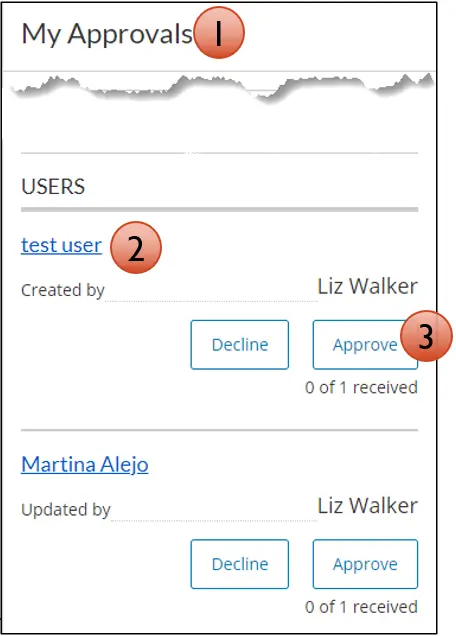
The user appears in the My Approvals widget.
Steps to Approve a User:
1.Go to My Approvals widget.
2.Click the user’s name to review details.
3.Select Approve.
4.Complete authentication.
Contact us
We use cookies and tracking technologies to enhance performance, improve functionality, and advertise. The data shared with marketing platforms through these technologies does NOT include financial information. For more details, see our Online Privacy Notice and Terms of Use.